
How to create a free email address
- Reading
- 5 mins
- Category
- Create account
With Proton Mail, you can create a free and genuinely private email account that doesn’t track you, sell your data, or show you ads.
Your messages and other data are protected by end-to-end and zero-access encryption, so nobody else can read them — not even us.
How to create a free Proton Mail address
- Go to account.proton.me/signup and select the Free plan.

2. Enter your username and create a password.

3. Click Start using Proton Mail now. You may be asked to prove you’re a human.
4. Download your Recovery Kit. Check the confirmation box and select Continue.

5. Add your display name and click Continue.
6. When asked to select a Proton service, click Mail to go to your Proton Mail inbox.
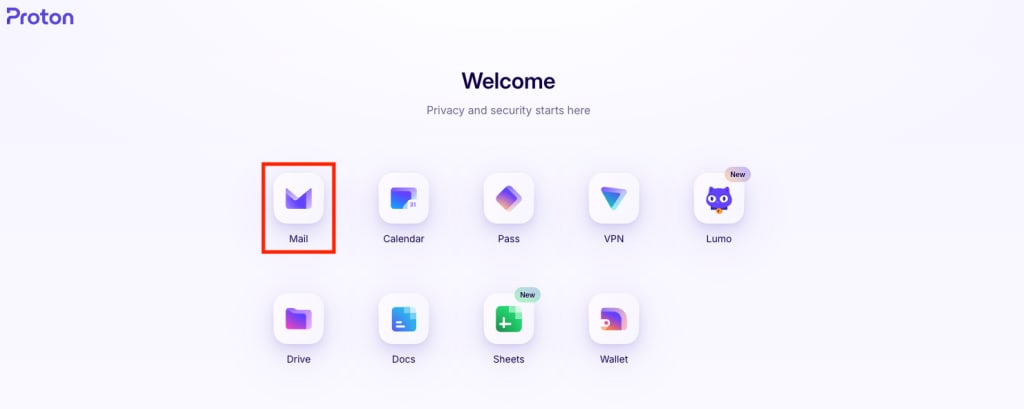
That’s it. Your encrypted email account is now open, and you can start sending and receiving messages from your new email address.

Next steps
Make the most of your free encrypted inbox with our easy mail import and forwarding features. You can also unlock extra storage for your account.
Why choose Proton Mail?
At Proton, our business is to protect your privacy, not violate it. We don’t spy on you, target you with ads, or sell your data to anyone. All our funding comes from paying members of the Proton community.
Proton Mail has all the features you would expect from a leading email provider, including:
- Send secure emails, even to people who don’t use Proton Mail
- Create email aliases to protect your identity
- Folders, strong spam filters, and scheduled emails
- Get free access to all Proton’s privacy-by-default services, including Proton Calendar, Proton Drive, and Proton VPN(new window)
When you use Proton, all your information is protected by strict Swiss privacy laws.